Composição de Skins
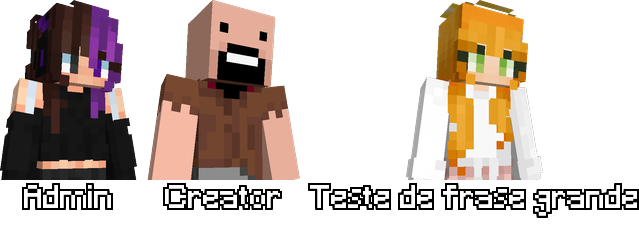
Crie imagens compostas com múltiplas skins de Minecraft usando o endpoint POST de composição.
Índice de documentação: /api/templates
Endpoint
POST /api/minecraft/render/composition
Este endpoint aceita um array JSON com até 10 items (nicks ou URLs de skins) e retorna uma imagem PNG composta.
Formato da Requisição
Envie um POST com um JSON Array contendo os itens. Cada item pode ter:
| Campo | Tipo | Obrigatório | Descrição |
|---|---|---|---|
value | string | ✓ | Nick do jogador ou URL da skin |
type | string | ✗ | "nick" ou "url" (auto-detectado se omitido) |
label | string | ✗ | Texto a exibir abaixo da skin (padrão: nick ou vazio) |
Exemplos
Exemplo 1: Múltiplos Nicks
[
    {"value": "St4rx3"},
    {"value": "Notch"},
    {"value": "Dinnerbone"}
]
Exemplo 2: Nicks com Labels Customizados
[
    {"value": "St4rx3", "label": "Admin"},
    {"value": "Notch", "label": "Criador"},
    {"value": "jeb_", "label": "Desenvolvedor"}
]
Exemplo 3: Skin Customizada por URL
[
    {
      "value": "https://textures.minecraft.net/texture/...",
      "type": "url",
      "label": "Skin Custom"
    },
    {"value": "Notch"}
]
Exemplo 4: Combinação de Nicks e URLs
[
    {"value": "St4rx3", "label": "Jogador 1"},
    {
      "value": "https://textures.minecraft.net/texture/...",
      "type": "url",
      "label": "Skin Custom"
    }
]
⚠️ Limitações:
- Máximo de 10 items por requisição
- URLs de skins devem usar o modelo "steve" (definido automaticamente)
- A imagem resultante tem fundo transparente
Como Usar (cURL)
curl -X POST https://nebulaapi.app/api/minecraft/render/composition \
  -H "Content-Type: application/json" \
  -d '[
      {"value": "St4rx3"},
      {"value": "Notch"}
  ]' \
  --output composition.png
Como Usar (Python)
import requests

url = "https://nebulaapi.app/api/minecraft/render/composition"
data = [
    {"value": "St4rx3", "label": "Admin"},
    {"value": "Notch", "label": "Creator"}
]

response = requests.post(url, json=data)
with open("composition.png", "wb") as f:
    f.write(response.content)
Como Usar (JavaScript/Fetch)
fetch('https://nebulaapi.app/api/minecraft/render/composition', {
  method: 'POST',
  headers: {
    'Content-Type': 'application/json'
  },
  body: JSON.stringify([
      {value: 'St4rx3', label: 'Admin'},
      {value: 'Notch', label: 'Creator'}
  ])
})
.then(response => response.blob())
.then(blob => {
  const url = URL.createObjectURL(blob);
  const img = document.createElement('img');
  img.src = url;
  document.body.appendChild(img);
});
Resposta
A resposta é uma imagem PNG com:
- Fundo transparente
- Skins alinhadas horizontalmente
- Labels (se fornecidos) centralizados abaixo de cada skin
- Espaçamento automático entre as skins
Pré-visualização